
M3-S2 — Sign-in options and your users’ account security
Section titled “M3-S2 — Sign-in options and your users’ account security”| Module | M3 — Spaces, sign-in and the operator hand-offs |
| After this session you can | Choose how people sign in on each domain without locking anyone out, and support people with passwords, second factors, lockouts and “I can’t sign in”. |
| Time | Facilitated: 34 min · On your own: 34 min |
| Before you start | M3-S1: you opened Default Domain. Ziad is signed in in your private window. |
| Go deeper | Sign-in methods & single sign-on · Account security · Human verification |
◆ Orientation (1 min) — The door to everything
Section titled “◆ Orientation (1 min) — The door to everything”Every one of Northwind’s people comes in through the sign-in page. Make it too weak and a guessed password opens salaries; make it too strict, or break it, and nobody works. You decide what the sign-in page offers on each domain, and you are the first person people call when it does not let them in.
▤ Concept (8 min) — What you switch on, what people manage, what you can do for them
Section titled “▤ Concept (8 min) — What you switch on, what people manage, what you can do for them”A domain’s sign-in options
Section titled “A domain’s sign-in options”What the sign-in page offers depends on the domain of the address people use. You change it by editing the domain’s record (Data Entities › Domain): Edit, set the fields, Save. The change applies at the next sign-in on that domain; people already signed in stay signed in.
| Field | When it is on |
|---|---|
| Support Local Sign in | The page shows the username-or-email and password form |
| Support Passkey | The page offers a passkey (fingerprint, face or device PIN), and people can add passkeys to their account |
| SMS 2FA | After the password, people type a code sent by text message |
| Email 2FA | After the password, people type a code sent by email |
| Allow Password Step-Up | People with no second-factor method may confirm with their password before they see a protected value (you relied on it in M2-S3) |
Three more things decide what people meet:
- An authenticator app is switched on by each person, on their own Security page. From then on they are always asked for a code, whatever the domain says.
- WhatsApp codes, once your organization sets them up, are asked of everyone with a verified phone number, even on a domain where SMS and email codes are off. If everyone is suddenly asked for a code, this is usually why.
- Single sign-on buttons are linked to a domain by your operator (M3-S3).
What people manage themselves
Section titled “What people manage themselves”Under their picture › User Preferences, each person has a Security section and Logins:
| Card | What they do there |
|---|---|
| Password | Change their password |
| Two-factor authentication | Turn on an authenticator app, choose their default method, and keep their 8 one-time recovery codes, shown only once |
| Passkeys | Add or remove passkeys |
| Sessions | See every device signed in, and sign one out |
| Attempts | See recent sign-ins, including failed ones |
People who sign in through single sign-on see a message instead of the two-factor and passkey cards: those are managed by the company’s identity provider.
What you can do for them
Section titled “What you can do for them”| They say | What you do |
|---|---|
| “I forgot my password” | Forgot password? on the sign-in page; if that fails, Reset Password (M1-S1). Only the newest link works, for 24 hours by default. Single sign-on and directory users have no Osos password: send them to whoever runs the company identity provider. |
| “Account is locked” | Wait: the lock ends by itself after a few minutes, longer on repeats. There is no unlock button. |
| “Someone may know my password” | Deactivate the account at once (it signs out every device), then activate it and have them change the password. |
| “Was that sign-in me?” | Ask them to open Attempts and Sessions, and sign out any device they do not recognize. |
| “I lost my phone with my authenticator app” | They sign in with one of their recovery codes and set up the app again. |
Human verification: two places, two owners
Section titled “Human verification: two places, two owners”Osos checks that a real person, not a bot, is using two places:
| Public forms | Sign-in pages | |
|---|---|---|
| Who turns it on | App builders, one public form at a time | The operator, for the whole platform; on by default |
| What people see | An I’m not a robot box | Nothing; at most a short pause |
| If the checking service is down | Visitors cannot submit protected forms | Nobody can sign in, complete the second step or reset a password |
A failed sign-in check shows the same message as a wrong password, so “I can’t sign in” can have either cause. If suddenly nobody can sign in, ask the operator to check human verification first. People who are signed in are never asked to verify on forms.
⛏ Lab (9 min) — Read the trail, then choose the options
Section titled “⛏ Lab (9 min) — Read the trail, then choose the options”Goal. See what a person sees when supporting their sign-in, then choose sign-in options for two of Northwind’s domains.
- In the private window, sign Ziad out. On the sign-in page, enter his username with a wrong password once, then sign in correctly.
- As Ziad, open his picture › User Preferences. In Logins, open Attempts: the failed attempt and the successful one are listed. Open Sessions: this browser is listed.
- In your own window, open your own User Preferences › Security. Read the Two-factor authentication card: which methods are listed, and which say Disabled. Change nothing.
- Open Default Domain again (Administration › Applications › Data Entities › Domain; open it from the list, because the search box does not find it by name) and write down its five sign-in options as they are today.
- On paper or in a text file, choose the options for two domains Northwind will have, and give one
reason for each choice:
- Staff domain: all employees, who will move to single sign-on later this year (M3-S3).
- Partner domain: about twenty customs brokers from partner firms, with Osos passwords, who will see shipment values.
- Compare with the model answer below.
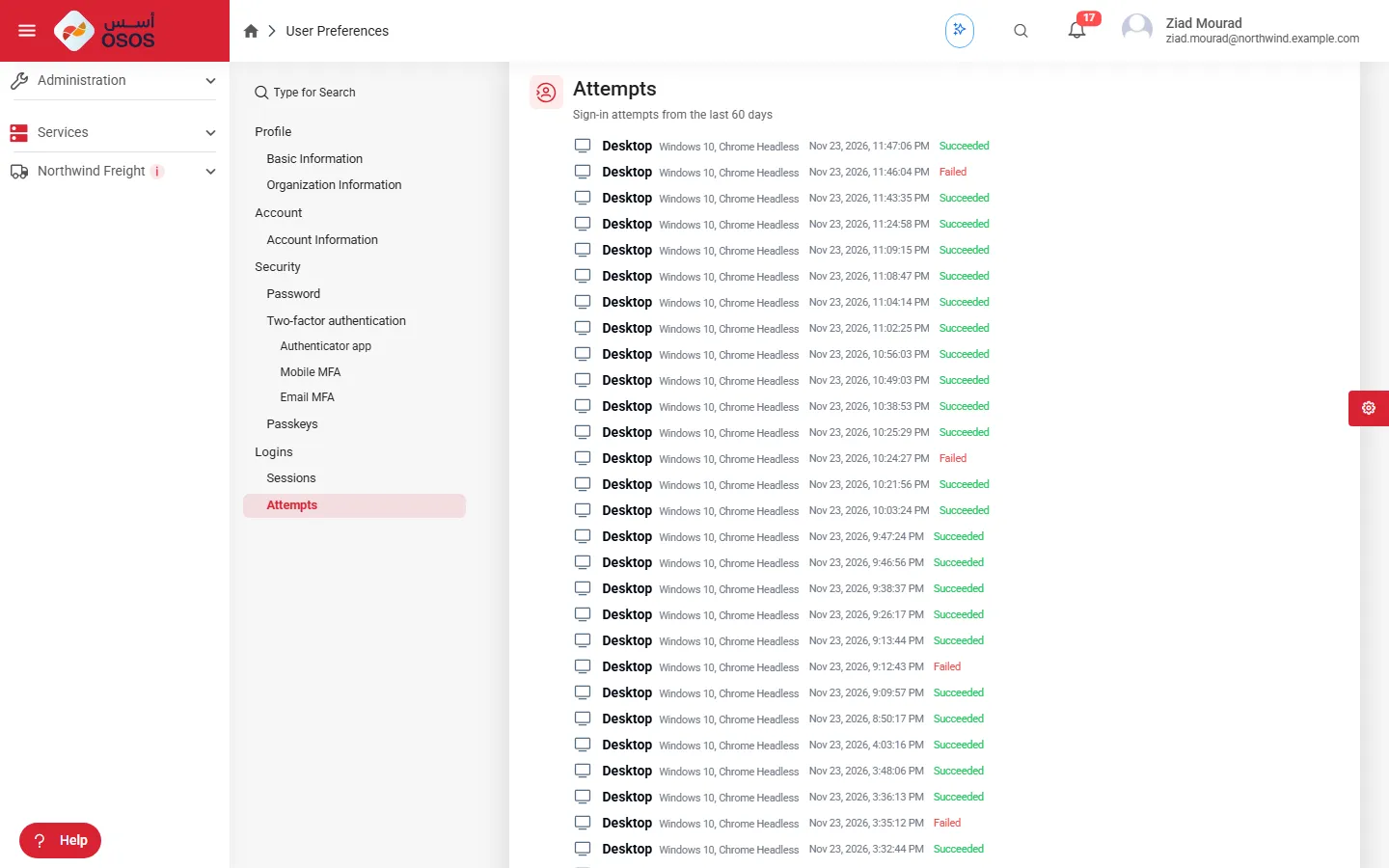 What to notice: people can check their own sign-in history. A failed attempt they did not make is the first sign of a guessed password.
Check.
- Ziad’s Attempts shows your failed attempt and the successful sign-in.
- You know which second-factor methods your own account offers.
- You recorded Default Domain’s five options.
- Your choice for each domain gives a reason, and keeps a tested way in.
Pass condition. You saw the failed attempt from Ziad’s side, and your two domain choices match the model answer in substance, or differ for a reason you can state.
If something goes wrong
| What you see | What to do |
|---|---|
| Ziad’s account is locked | You entered the wrong password five times. Wait a few minutes; the lock ends by itself. |
| No Attempts under Logins | Scroll the User Preferences page, or use its index (on a narrow screen, Show index). |
| Ziad is asked for a code he cannot receive | Someone turned on a second factor on Default Domain. Turn it back off in your window; practice addresses receive no email. |
Model answer
| Option | Staff domain | Partner domain |
|---|---|---|
| Support Local Sign in | On, until single sign-on is tested with real accounts and at least one administrator; then off | On: brokers have Osos passwords |
| Support Passkey | On: a faster, safer sign-in for anyone who wants one | On |
| SMS 2FA / Email 2FA | Off for now; once single sign-on is live, the company’s identity provider applies its own second factor | Email 2FA on: outsiders with passwords who see shipment values need a second step. Use SMS 2FA instead if every broker’s phone number is on their account. |
| Allow Password Step-Up | Off, once people have second-factor methods; until then, on, so grant holders can reveal values | Off: brokers hold no sensitive-field grants |
The common thread: a second step where passwords alone guard valuable data, and never switching off the password form before the replacement is proven.
◇ Worked scenario (2 min) — Five “I can’t sign in” calls
Section titled “◇ Worked scenario (2 min) — Five “I can’t sign in” calls”1. Dana: “It says my account is locked.” Five wrong passwords in a row. Nothing to unlock: she waits a few minutes. If it keeps happening, she uses Forgot password?.
2. Ziad: “It says the account is deactivated.” Somebody deactivated it, perhaps by mistake during an offboarding. Check Users; if it is wrong, Activate Account.
3. Samir, a single sign-on user: “Send me a password reset.” He has no Osos password; his password lives in the company’s identity provider. Send him to whoever runs it.
4. Monday morning, ten calls in ten minutes: “My password is wrong”, from people who never forget it. One person mistyping is a password problem; everyone at once is not. The sign-in check for human verification shows the same message as a wrong password, and it blocks sign-in when its service is down. Ask the operator to check it first.
5. Hana: “Since yesterday it asks me for a code, and I never turned that on.” Ask whether she has a verified phone number and whether WhatsApp codes were set up yesterday: they apply to everyone with a verified phone, whatever the domain says. If not, check the domain’s SMS 2FA and Email 2FA.
✓ Practice (5 min) — Check your understanding
Section titled “✓ Practice (5 min) — Check your understanding”Single sign-on works for you. You want to turn off passwords on the staff domain today. What must be true first?
Check your answer
The correct answer is B. Open the explanation under each option to see why.
Dana thinks someone used her account last night. What do you ask her to do first?
Check your answer
The correct answer is B. Open the explanation under each option to see why.
A public job application form shows I’m not a robot. A visitor says it keeps failing. Who turns this check on or off for the form?
Check your answer
The correct answer is B. Open the explanation under each option to see why.
True or false: Samir, who signs in through single sign-on, can turn on a Osos authenticator app on his Security page.
Check your answer
The correct answer is B (False). Open the explanation under each option to see why.
↺ Recap (1 min) — What you can do now
Section titled “↺ Recap (1 min) — What you can do now”You can choose a domain’s sign-in options without locking anyone out, read a person’s sign-in trail with them, answer the common “I can’t sign in” calls, and tell which human verification failed and who owns it.
Next. Two jobs need the operator: connecting single sign-on and importing people from the company directory. In M3-S3 you prepare both, so the operator can do them right the first time.