
M2-S4 — Cover and leavers: delegation and offboarding
Section titled “M2-S4 — Cover and leavers: delegation and offboarding”| Module | M2 — Access, at full depth |
| After this session you can | Set up cover for a colleague on leave with exactly the reach it needs, end it cleanly, and offboard a leaver so that nothing is left behind. |
| Time | Facilitated: 45 min · On your own: 45 min |
| Before you start | M2-S3. Ziad’s expense claim from M2-S2 is waiting for Hana. Hana is signed in in your private window. |
| Go deeper | Delegation · Managing users: offboard someone who leaves |
◆ Orientation (1 min) — Two absences
Section titled “◆ Orientation (1 min) — Two absences”Hana goes on leave for two weeks, and Ziad’s claim is waiting for her. Dana should approve expense claims in her place, and nothing else: she must not see what else Hana can see. In the same week, Majd leaves Northwind for good. Both are about people who are not there, and both are easy to get half right.
▤ Concept (5 min) — Cover with a delegation, close with a checklist
Section titled “▤ Concept (5 min) — Cover with a delegation, close with a checklist”A delegation in one sentence
Section titled “A delegation in one sentence”A delegation lets one person, the Delegated To, act as another, the Delegator, for a period from From Date to an optional To Date. While it is in effect, Dana switches into Hana’s account from her own and works as Hana: she sees Hana’s work and approves in her place. Everything is done in Hana’s name, and Osos also records that Dana did it. Nobody shares a password. The delegate never gets more than the delegator has.
You set up delegations as records of the Delegation entity under Administration › Applications › Data Entities. A user record’s Delegation tab also lists them, but when you add one there, Delegator is filled with your own name and cannot be changed, so an administrator cannot create cover for someone else from that tab.
Its scope: what the cover reaches
Section titled “Its scope: what the cover reaches”| Base | What the delegate gets | Use it when |
|---|---|---|
| Allow All | Everything the delegator can do, except what you pick under Exception | The cover is almost complete; you list the few things to keep out |
| Deny All | Nothing, except what you pick under Exception | The cover is narrow; you list exactly what is covered |
The Exception tree lists the applications’ views, pages and reports, and each service in three separate parts: submitting new requests, seeing the requests, and the inbox (the requests waiting for the delegator to act). The delegate’s Inbox, Outbox, Watching and catalog follow the same scope.
Administration rights are a separate choice, Administration. Leave it empty unless the cover really includes administration work. Empty, with Allow All and no exceptions, the delegate gets the delegator’s system level below Admin, never Admin itself; empty with Deny All or with exceptions, none of it.
Forward Notifications and Forward Emails send the delegate a copy of what automations send the delegator, for the work the scope covers. Both are off by default.
When it works, and how it ends
Section titled “When it works, and how it ends”A delegation works only while Is Active is Active, the From Date has passed, the To Date is empty or still ahead, and it is not archived. It ends by itself at its To Date. To end it early, set the To Date to now, set Is Active to Inactive, or archive it. Every change applies at the delegate’s next action.
The delegate switches in from their profile menu, under Delegations, and back with Exit. While they act for someone, the top of the screen shows both names.
Offboarding: the order matters
Section titled “Offboarding: the order matters”Deactivating a leaver stops their sign-in at once, but it does not take them out of groups, roles or delegations, and it does not hand over their open work. Close everything in this order:
| Step | Why |
|---|---|
| 1. Deactivate the account | Signs them out everywhere, at once (M1-S1) |
| 2. Hand over open work: on each request waiting for them, Admin Actions › Change Owner | Requests stay with the leaver until someone moves them |
| 3. End their delegations, as delegator and as delegate | A delegation does not end with the account |
| 4. Remove them from groups and roles | A step owned by a group can still land on a deactivated member (M1-S3) |
| 5. Remove grants given to them directly, in User Permissions | Rows marked Direct belong to the person, not to a group |
| 6. Give their unit a new manager, if they managed one | Otherwise approvals move up to the next manager (M1-S2) |
If the person was imported from a company directory, also make sure they are removed or disabled there: the import never deactivates anyone (M3).
⛏ Lab (32 min) — Dana covers Hana; Majd leaves
Section titled “⛏ Lab (32 min) — Dana covers Hana; Majd leaves”Goal. Set up a narrow cover for Hana and prove it as Dana, then offboard Majd completely.
Cover for Hana
- Open Administration › Applications › Data Entities › Delegation and add a record. (Do not use Hana’s own Delegation tab: there Delegator is locked to you.)
- Set Delegator Hana Saadeh, Delegated To Dana Kassem, From Date today, To Date two weeks from today, and Is Active Active.
- In Delegation Scope, set Base to Deny All. Under Exception, open Services › Expense Claim and pick its inbox only. Leave Administration empty.
- Turn on Forward Notifications. Select DONE to save.
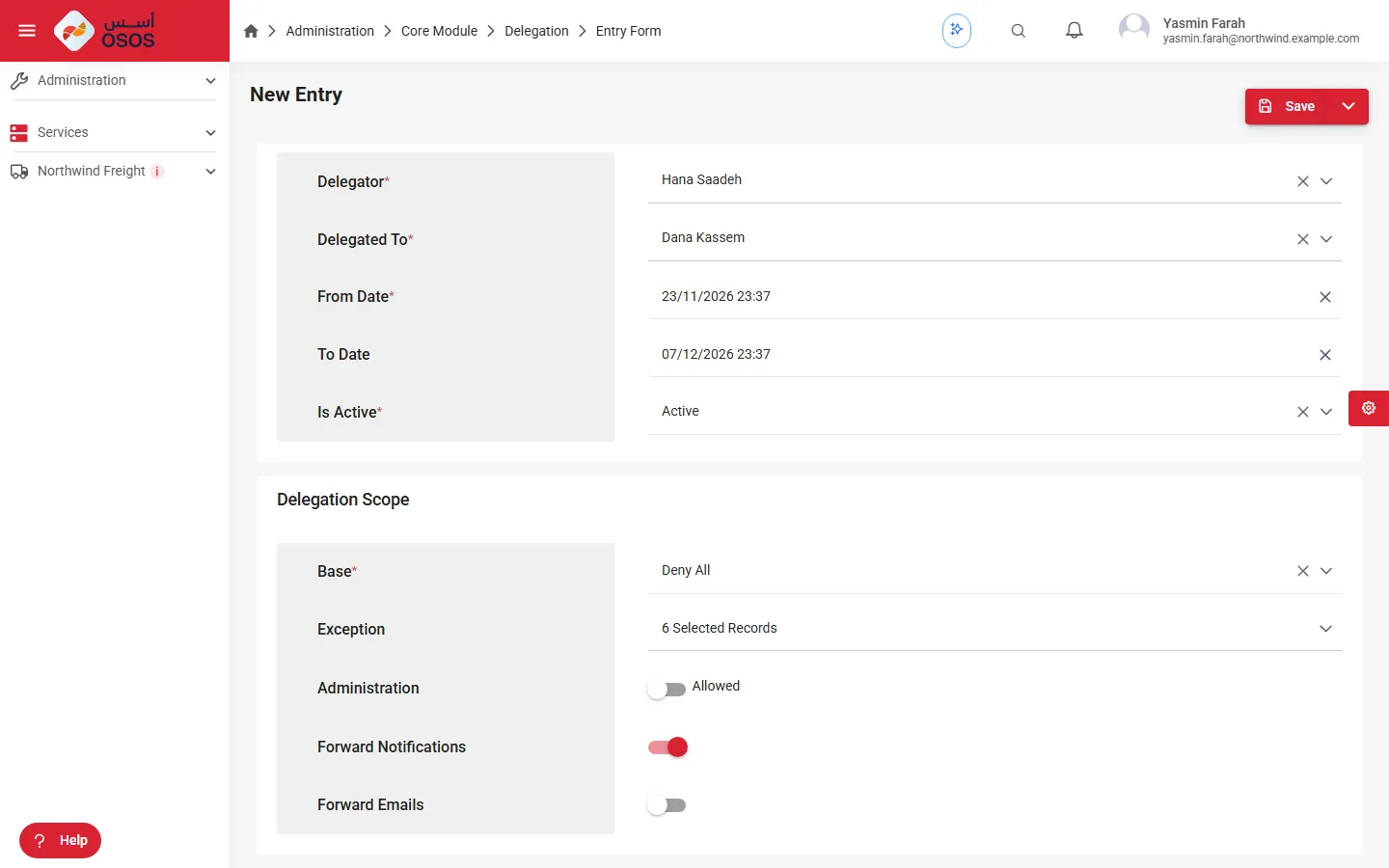 What to notice: with Deny All, the Exception list is everything Dana gets. Administration is left empty.
Prove it as Dana
Optional, 45 seconds. Before step 5 you can watch a colleague work on behalf of another. The steps below give everything in writing, so you can skip the video.
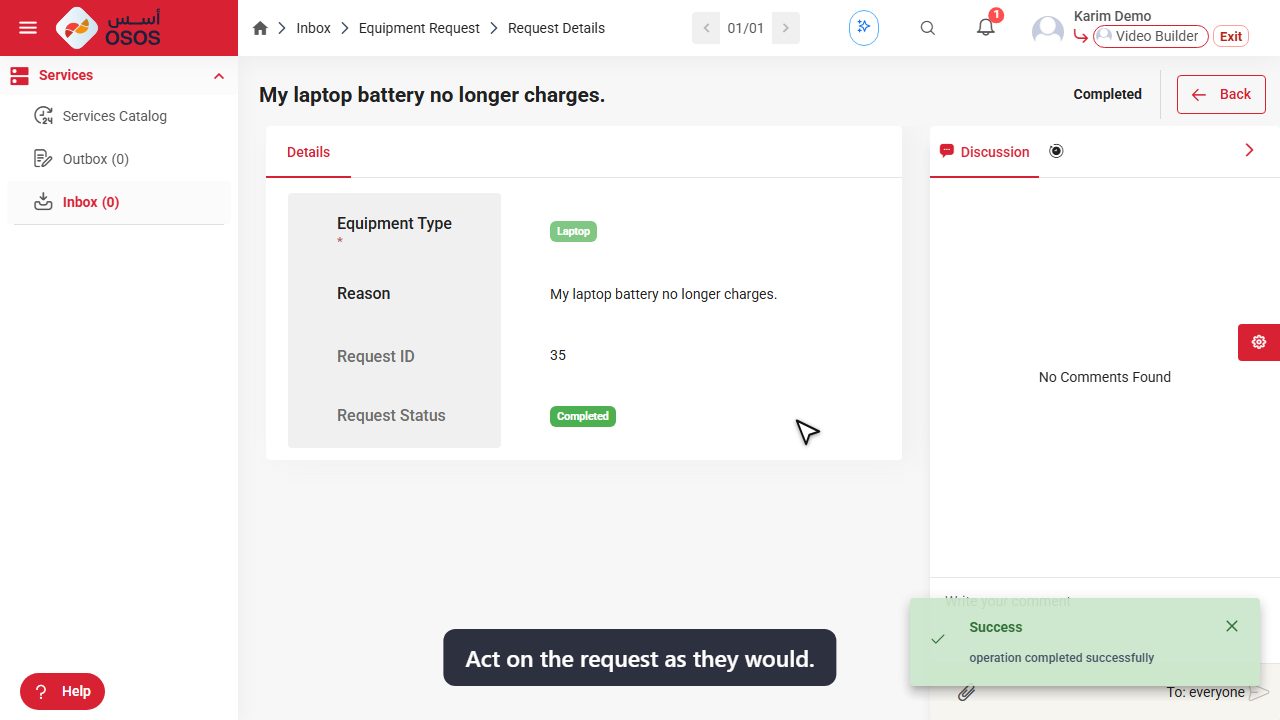
How-to · 45 s
Work on behalf of a colleague
What to notice: the switch is made from your profile menu, under Delegations; the top bar then shows your name, an arrow and your colleague’s, so you always know you are acting for them. Their Inbox is yours to work on, and Exit makes you yourself again. The video is recorded with another account, Video Builder, as the delegator; in the lab Dana acts for Hana, and the cover reaches only the Expense Claim inbox.
-
In the private window, sign Hana out and sign in as Dana Kassem.
-
Open the profile menu (your picture or name at the top). Under Delegations, select Hana Saadeh. The top of the screen now shows Dana’s name, an arrow and Hana’s. Screenshot pending The top bar while Dana Kassem acts for Hana Saadeh, showing Dana's name, an arrow and Hana's name, with the Inbox open on Ziad's expense claim What to notice: both names stay on screen, so it is always clear who is acting for whom. Everything Dana does here is done in Hana’s name and recorded as Dana’s.
-
Open Services › Inbox. The Inbox badge counts Ziad’s claim (1), but while you act for Hana the table below it can stay empty: a known product defect. The table lists Request ID, Service Category, Service Name and Request Status, never the purpose. Try reloading the page; if the row still does not show, carry on: the badge is your proof that the claim reaches Dana, and you open the claim itself in M4.
-
Look at the sidebar: Staff Overview, which Hana can open, is not offered to Dana while she acts for Hana. The cover reaches the claim inbox only.
-
Select Exit. Dana is back in her own account.
Offboard Majd
- In your own window, open Users, select the three dots (…) on Majd Saber’s row, choose Deactivate Account and confirm.
- Open Users Groups › Northwind Safety Committee › Users and remove Majd.
- Open Access Management › User Permissions, choose Majd Saber, and on End User Permissions delete the Direct row for Shipment Board.
- Open Administration › Applications › Data Entities › Delegation. Open the delegation whose Delegator is Majd (to Ziad), edit it, set Is Active to Inactive, and save.
- Check the remaining steps: Majd manages no unit, and no request is waiting for him. Write that down, so your offboarding record is complete.
- Open User Permissions for Majd again. No Direct row remains; what is left comes from Northwind Everyone, which he leaves as soon as his account is archived or his address changes, and which does nothing while he cannot sign in.
- In the private window, sign Dana out and try to sign in as Majd: refused.
- Sign Ziad back in, in the private window.
Check.
- Hana’s delegation to Dana is Active, Deny All, with the Expense Claim inbox as its only exception, ending in two weeks.
- As Dana, you switched into Hana’s account and saw Ziad’s claim in the Inbox.
- While acting for Hana, Dana did not get Staff Overview.
- Majd’s account is deactivated and his sign-in is refused.
- Majd is no longer in Northwind Safety Committee.
- Majd has no Direct grant left, and his delegation to Ziad is Inactive.
- Your note records the two checks that needed no change (manager, open requests).
Pass condition. Dana reaches exactly Hana’s claim inbox while acting for her, and Majd is closed on all six offboarding steps, with each one either done or recorded as not needed.
If something goes wrong
| What you see | What to do |
|---|---|
| Dana has no Delegations section | Check the four conditions: Is Active, From Date not in the future, To Date not passed, not archived. |
| Dana switches in but the Inbox is empty | The claim was not sent in M2-S2 (it is still in Ziad’s Outbox), or you picked a different part of the service than its inbox. |
| Dana sees everything Hana sees | Base is Allow All. Edit the delegation to Deny All. |
| The Direct row has no delete action | You are on a group’s row. Only Direct rows belong to the person. |
| Majd is still listed in the committee | You removed the dialog row but did not confirm with Save Changes. |
Model answer
Why it came out this way:
- The cover is narrow because the need is narrow: Dana approves claims for two weeks. Deny All plus one exception gives exactly that; Hana’s salary access, which Dana must not have, is out of reach. The To Date ends it by itself; Forward Notifications makes sure Dana hears about new claims for Hana.
- The offboarding follows the order: deactivate first (he is out at once), then close what deactivation leaves open: his group, his direct grant, his delegation. He managed nothing and owned no open request, and you recorded that. A complete record is part of the job: the next audit asks what was done and when.
◇ Worked scenario (1 min) — Three cover requests
Section titled “◇ Worked scenario (1 min) — Three cover requests”1. “Samir is away for a week. Hana should do everything he does, except open the salary reports.” Almost everything is covered: Allow All, with the salary reports picked under Exception. Leave Administration empty: Hana does not need Samir’s administration rights to run the business for a week.
2. “Our IT administrator is away. Her deputy must keep managing users.” This is the rare case for Administration Allowed: the deputy gets the absent administrator’s administration access, including Admin. Keep the period short, and remember you can see and remove it in User Permissions, where it is listed as Indirect (Delegation). A better long-term answer is a second administrator with their own Admin level.
3. “Ziad will cover Majd’s work after he leaves.” Not a delegation. A delegation lets one active person act for another active person for a period; a leaver is offboarded, and his work is handed over with Change Owner and by placing Ziad in the right groups and roles.
✓ Practice (5 min) — Check your understanding
Section titled “✓ Practice (5 min) — Check your understanding”Hana’s deputy should handle only her purchase approvals while she is away. Which scope do you set?
Check your answer
The correct answer is B. Open the explanation under each option to see why.
A delegation has Is Active Active, a From Date of next Monday and no To Date. Today is Thursday. The delegate says they cannot switch into the delegator’s account. Why?
Check your answer
The correct answer is A. Open the explanation under each option to see why.
Put these offboarding steps for a leaver in the right order.
Check your answer
The correct order is C → E → D → B → A. Open the explanation under each item to see why it sits where it does.
True or false: once a leaver’s account is deactivated, their group memberships and delegations end by themselves.
Check your answer
The correct answer is B (False). Open the explanation under each option to see why.
↺ Recap (1 min) — After Module 2 you can
Section titled “↺ Recap (1 min) — After Module 2 you can”After this module you can design Northwind’s access from business needs, grant it on the right screens and prove it as the people it affects; decide who reads protected values; set up cover with exactly the reach it needs; and close a leaver’s account without leaving anything open.
Next. Module 3 steps back to the tenant itself: its spaces and web addresses, how people sign in, and the two jobs you prepare for the operator: single sign-on and the directory import.