
M2-S2 — Design, grant and prove Northwind’s access
Section titled “M2-S2 — Design, grant and prove Northwind’s access”| Module | M2 — Access, at full depth |
| After this session you can | Design access from business needs, grant it on the right screens, and prove it from the person’s side. |
| Time | Facilitated: 66 min · On your own: 63 min |
| Before you start | M2-S1: the levels and the rules. Ziad is signed in in your private window. |
| Go deeper | Manage permissions · Let the HR group see only HR requests |
◆ Orientation (1 min) — From needs to grants
Section titled “◆ Orientation (1 min) — From needs to grants”Northwind’s operations lead has sent you six needs. Your job is to turn them into grants that give each person exactly what their work needs, no more, and to prove it before anyone asks. By the end of this session Ziad’s empty screen is gone, and the first expense claim is on its way.
▤ Concept (2 min) — Designing access in five columns
Section titled “▤ Concept (2 min) — Designing access in five columns”Design before you click. For every need, fill in five columns:
| Need | Who | To what | How much, or which setting | Screen |
|---|---|---|---|---|
| The business sentence | The principal: which kind of group (M1-S3), rarely a person | System, module, entity, view, page, report or service | A level, or Audience / Watcher for a service | Where you set it |
Four habits make a design safe and cheap to keep:
- Least access. Give what the work needs. If someone only reads records, share a view instead of giving Edit on the entity.
- Groups, not people. A grant to a group follows people as they join and leave. A direct grant to a person is the exception, and you note why.
- One base level for everyone, given once, to a group that fills itself. Every person needs a system level; a query group such as Northwind Everyone gives it to every new joiner on day one.
- Keep departments low at the system level. Edit or Admin at the system level reach every entity and every service’s records. Departments get their extra access on their own modules, entities, views and services.
One detail of the screens matters for the order of work: a group is listed on a module’s or entity’s Permissions tab only once the group itself has a system level. Restricted is enough.
⛏ Lab (27 min) — Northwind’s access, granted and proved
Section titled “⛏ Lab (27 min) — Northwind’s access, granted and proved”Goal. Design Northwind’s access from six needs, grant it, and prove it as Ziad and Dana.
The needs
| # | Need |
|---|---|
| R1 | Everyone at Northwind can sign in, use what is shared with them, and submit expense claims. |
| R2 | Dispatch opens the Shipment Board. |
| R3 | Finance keeps the Invoices records up to date in Administration. |
| R4 | Finance follows every expense claim, without approving any. |
| R5 | Only Northwind people can submit an Expense Claim. |
| R6 | Nobody in Dispatch or Finance can change an application’s design. |
- Design first. On paper or in a text file, fill in the five columns for R1 to R6. Then open the worked design below and compare. Correct your own before you grant anything.
Model answer
| # | Who | To what | How much, or which setting | Screen |
|---|---|---|---|---|
| R1 | Northwind Everyone (query group) | System level | View: the lowest level with the Services menu | Admin Permissions › Groups |
| R2 | Northwind Dispatch (org unit group) | View Shipment Board | Added to the view’s list | Group Permissions |
| R3 | Northwind Finance (org unit group) | Entity Invoices | Edit (records need Edit); first the group needs its own system level, Restricted | Admin Permissions, then the entity’s Permissions tab |
| R4 | Northwind Finance | Service Expense Claim | Watcher | Group Permissions |
| R5 | Northwind Everyone | Service Expense Claim | Audience | Group Permissions |
| R6 | Nobody | System level | No Northwind group above View | Check in Admin Permissions |
Grant
-
Open Administration › Access Management › Admin Permissions, select the Groups tab, then Add. In Select a group to add, choose Northwind Everyone; in Select permission level, choose View. Select Confirm. (R1)
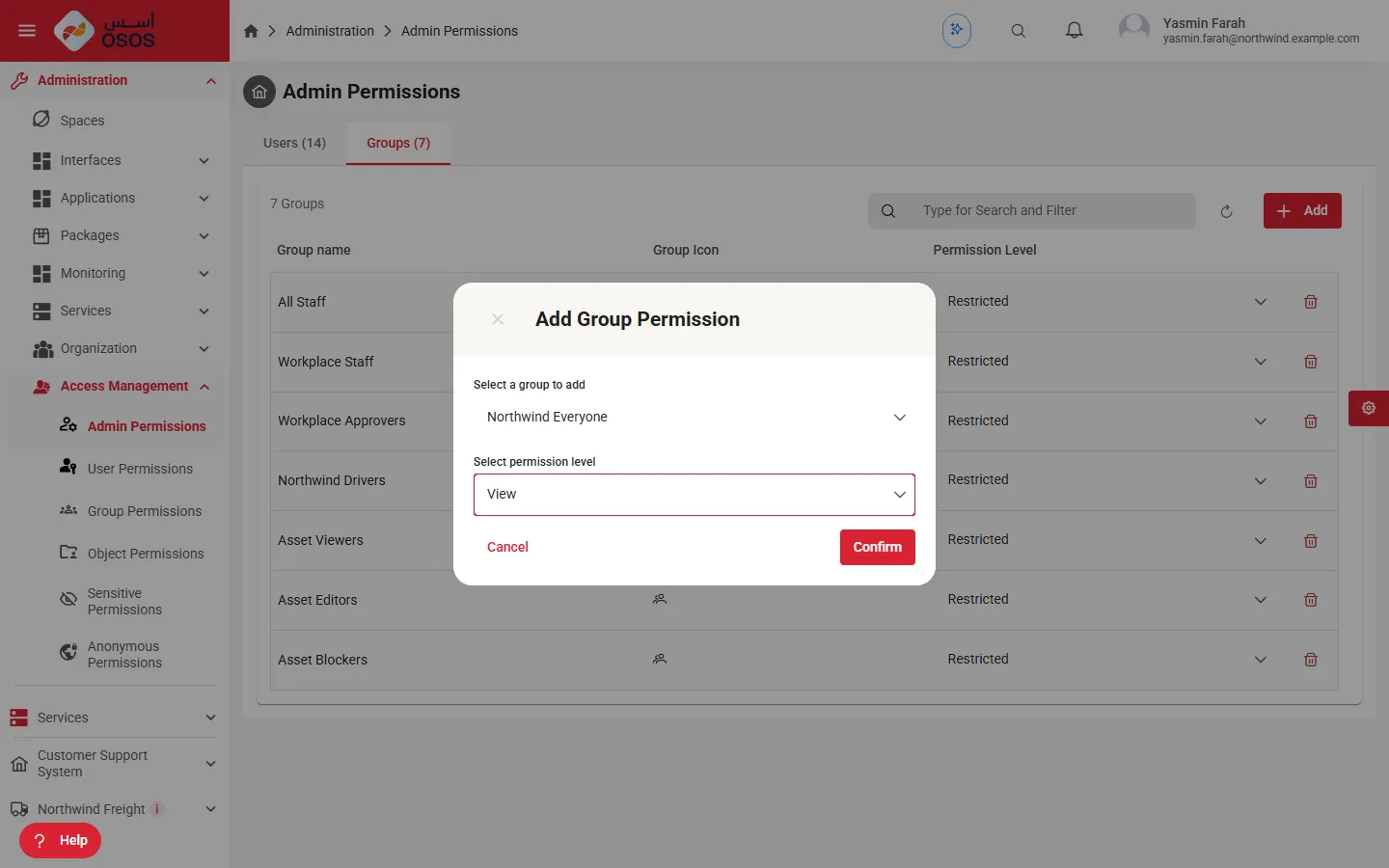 What to notice: one row gives every Northwind person their base level. View is the lowest level that shows the Services menu.
-
Select Add again and give Northwind Finance Restricted the same way. It changes nothing for its members, who already have View; it lets the group appear on entity screens. (R3)
-
Open Administration › Applications › Data Entities, open Invoices, its Permissions tab, and Groups. On the Northwind Finance row, set Permission Level to Edit. A confirmation reads “You are going to change role of Northwind Finance to be Edit”; nothing changes until you select CONFIRM. (R3)
-
Open Access Management › Group Permissions. In Select Group, choose Northwind Dispatch. Select Add Permission, choose Shipment Board in Object, and save. Read the warning first: the view is already in Restricted mode, so only the people and groups on its list can open it. (R2)
Then open Shipment Board once in the view builder and leave without saving anything. A view granted from Group Permissions may not reach the members’ sidebar until it has been opened there once, and a member may need to reload their window. Go deeper: Give a group access to a view
-
Still in Group Permissions, choose Northwind Finance. Select Add Permission, choose the service Expense Claim, choose Watcher, and save. (R4)
-
Choose Northwind Everyone. Select Add Permission, choose Expense Claim, choose Audience, and save. (R5)
-
Open Admin Permissions › Groups again and check R6: no Northwind group is above View.
Prove it on the screen
- Open Access Management › User Permissions and choose Ziad Mourad. On Admin Permissions, his system level is View, through Northwind Everyone. On End User Permissions, Shipment Board is Indirect (Group) through Northwind Dispatch, and Expense Claim is listed through Northwind Everyone.
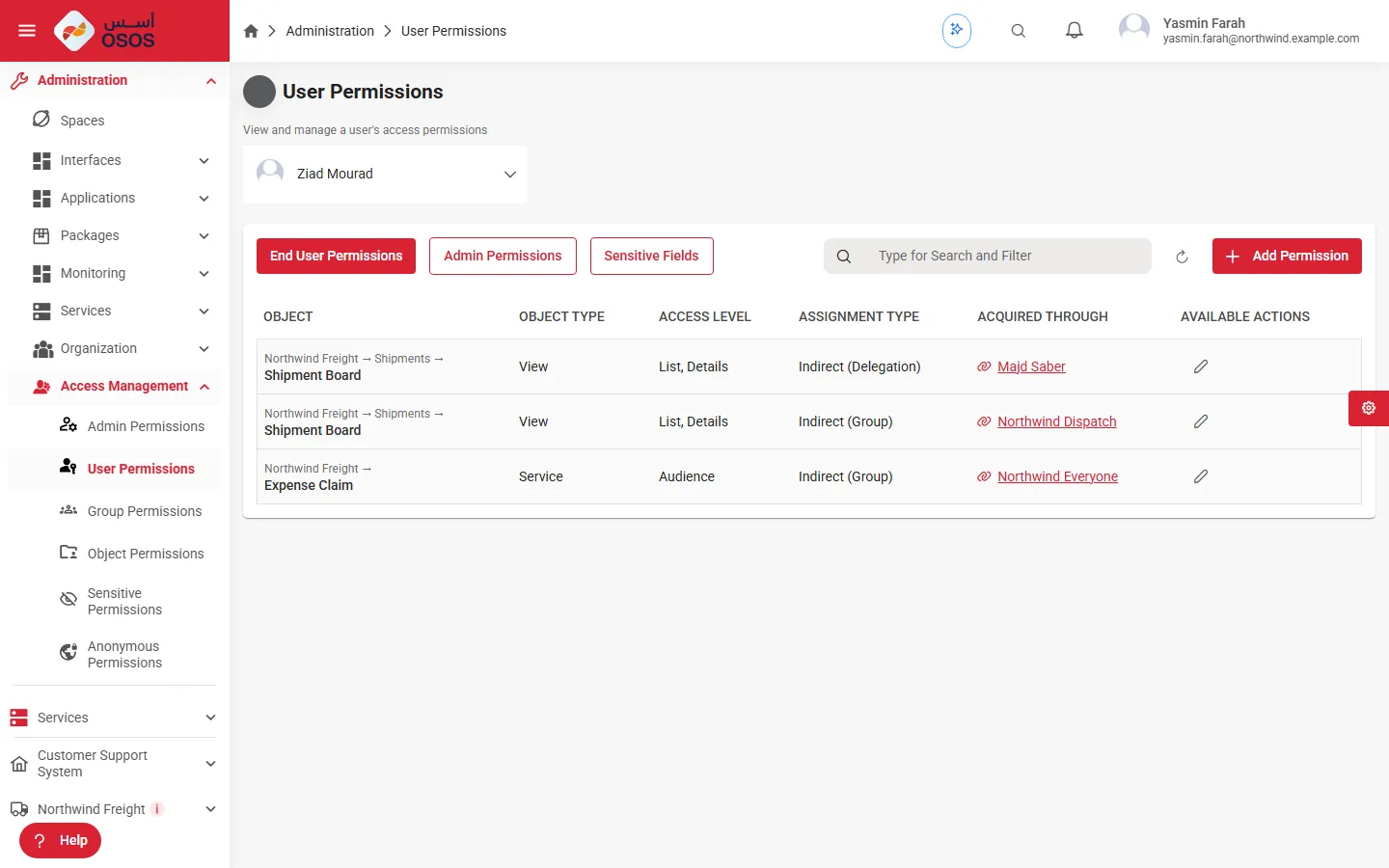 What to notice: every row names its source. None of Ziad’s access is given to him as a person.
Prove it as the people
- In the private window, reload Ziad’s page (if Northwind Freight is missing, check that you opened the view in step 5). His sidebar now shows Northwind Freight with Shipment Board, the Services menu, and a short Administration menu. Open Shipment Board.
- As Ziad, open Services › Services Catalog, point at the Expense Claim card and select Apply. In the New Request form, enter the Purpose Fuel for van NW-12, the Amount 85 and today’s Date. Select Save, then Save Changes.
- Open Services › Outbox. The list shows Request ID, Service Category, Service Name and Request Status, not the purpose, so open the Expense Claim row (a new claim shows as Draft). Select the action of its first step to send it (in your tenant it is Submit). The claim moves to the step Finance approval, owned by the Northwind Finance Manager role: Hana.
- Sign Ziad out of the private window and sign in as Dana Kassem. Open Administration › Applications › Data Entities › Invoices: the invoice records are listed.
- As Dana, open Services › Watching: Ziad’s Expense Claim is there, read-only, with Request Status On Going, Current Step Name Finance approval and Step Date. Current Step Owner is empty because a role, not a person, owns the step.
Take one grant away, and predict first
- Predict: if Finance’s Edit on Invoices is removed, what does Dana still see in Invoices? Write your answer down.
- In your own window, open Invoices › Permissions › Groups and set Northwind Finance back to Restricted. Confirm.
- In Dana’s window, reload Invoices. Compare with your prediction.
- In your own window, set Northwind Finance back to Edit on Invoices.
- Keep Dana signed in: you need her in M2-S3.
Check.
- Northwind Everyone has View and Northwind Finance Restricted in Admin Permissions; no Northwind group is higher.
- Northwind Finance has Edit on Invoices.
- Northwind Dispatch can open Shipment Board; Northwind Finance watches and Northwind Everyone is the audience of Expense Claim.
- Ziad’s User Permissions names a group as the source of every permission.
- As Ziad, you opened Shipment Board and submitted an expense claim.
- As Dana, you listed invoice records and saw Ziad’s claim under Watching.
- With Finance’s Edit removed, Dana kept the design of Invoices but lost its records, and got them back when you restored it.
Pass condition. Ziad and Dana each see exactly what R1 to R6 promise them, proved by signing in as them, and User Permissions shows a group, not a person, behind every grant.
If something goes wrong
| What you see | What to do |
|---|---|
| Northwind Finance is not on the Invoices Groups list | The group has no system level of its own. Do step 3 first. |
| Ziad’s sidebar has not changed | Reload his window. Then check his system level in User Permissions: is he in Northwind Everyone? |
| Ziad has no Services menu | His system level is Restricted or missing. Northwind Everyone must have View, not Restricted. |
| Expense Claim is missing from Ziad’s catalog | Northwind Everyone is not its Audience, or Ziad is not in that group. Check Object Permissions for the service. |
| The save of the claim does nothing | You selected Save but not Save Changes. |
| Dana’s Invoices list is empty | Finance’s grant is not Edit, or you are still in step 16. |
| “You cannot grant, change or revoke access above your own level” | Your own account is not a system Admin. Ask your training contact. |
Model answer
What the proof shows:
- Ziad now has the base level through Northwind Everyone, the board through his unit and the claim through the audience. He also sees a short Administration menu: that comes with View, the lowest level that shows Services. He can read designs there, but no records.
- Dana lists invoice records because her unit has Edit on Invoices, and she sees every claim under Watching because her unit is a watcher. She never approves: approval belongs to the step owner, Hana.
- The take-away test. With Finance’s grant set back to Restricted, the grant on Invoices was deleted, and Dana fell back to her system level, View: she still sees the design of Invoices, but not its records. Nothing “blocked” her; one source of access was simply gone. Restoring Edit brought the records back at her next reload.
✳ Discussion (13 min) — Is View for everyone too much?
Section titled “✳ Discussion (13 min) — Is View for everyone too much?”R1 gave every Northwind person View at the system level, so they can submit claims. A security reviewer objects:
- “Now every dispatcher sees an Administration menu. Isn’t that a risk?”
- “Why not give Restricted to everyone, and View only to the people who submit claims?”
- “Hana says only managers should even see the claim form. Can you do that without changing R1?”
With a facilitator. In threes, prepare the answer to each objection (6 min), then present and challenge one another’s answers (3 min).
On your own. Write two or three sentences for each objection, then compare with the model answer.
Model answer
- The menu is not a risk by itself. View shows the Applications menu with modules, entities, lists and dashboards as designs; it shows no records and allows no change. The real risks are Developer, Edit and Admin at the system level, and R6 keeps everyone below them. Tell people the menu is expected, so it does not become a helpdesk call.
- It would cost more and gain little. Almost everyone submits claims, so “only those who submit” is nearly everyone, kept up to date by hand. With the current product, View is the only way to give someone the Services menu; a split base level would add a group to maintain and a new way to get it wrong.
- Yes: change R5, not R1. Who can submit a service is its Audience. Replace Northwind Everyone with the managers’ groups as the audience (for example the role groups of the manager roles). Everyone keeps View; only the audience sees the claim in the Services Catalog.
✓ Practice (5 min) — Check your understanding
Section titled “✓ Practice (5 min) — Check your understanding”You open the Invoices entity’s Permissions tab to give Northwind Customs Edit, but the group is not in the list. What do you do first?
Check your answer
The correct answer is B. Open the explanation under each option to see why.
A dispatcher only needs to read shipment records, never to change them. Which design is best?
Check your answer
The correct answer is A. Open the explanation under each option to see why.
After your lab, Samir says: “Dana told me she still sees the Invoices entity after you removed Finance’s access for a moment. Your removal did not work.”
What do you answer?
Check your answer
The correct answer is B. Open the explanation under each option to see why.
How do you show Samir the evidence quickly?
Check your answer
The correct answer is B. Open the explanation under each option to see why.
↺ Recap (1 min) — What you can do now
Section titled “↺ Recap (1 min) — What you can do now”You can design access from business needs, grant it on the right screen, and prove it from the person’s side. Northwind’s people can work: Ziad has his board and has sent the first claim, and Finance keeps the invoices.
Next. Some values need more than access to a record. In M2-S3 you decide who may read Northwind’s salaries and bank accounts.