
M1-S3 — Groups: choose the right one
Section titled “M1-S3 — Groups: choose the right one”| Module | M1 — People and the org chart |
| After this session you can | Choose and create the right kind of group for a need, and keep its membership right without extra work. |
| Time | Facilitated: 41 min · On your own: 38 min |
| Before you start | M1-S2: Northwind Dispatch and its assignments exist. |
| Go deeper | Managing groups |
◆ Orientation (1 min) — One list, four kinds
Section titled “◆ Orientation (1 min) — One list, four kinds”In ACP you added a colleague to a group you were given. As the administrator, you decide which groups exist. Choose well and membership looks after itself; choose badly and you spend every Monday adding and removing people by hand. In M2 every access decision you make will name a group, so this choice comes first.
▤ Concept (5 min) — Four kinds of group, and how to choose
Section titled “▤ Concept (5 min) — Four kinds of group, and how to choose”The four kinds
Section titled “The four kinds”Instead of giving each person the same access one by one, you give it once to a group, and every member gets it. Groups are also used for work and messages: a builder can make a group the owner of a workflow step or the recipient of a notification.
| Kind (Group Type) | Who is in it | How it is kept up to date |
|---|---|---|
| Users Group | The people you add | By hand, under Administration › Organization › Users Groups |
| Query Group | Every user who matches a saved query, such as “everyone whose email is at Northwind” | By itself, as people’s details change. Under Query Groups. |
| Role Group | Everyone who holds a role, such as Northwind Dispatcher | By itself, from the assignments. Every role has one. |
| Org Unit Group | Everyone placed in a unit, such as Northwind Dispatch | By itself, from the assignments. Every unit has one. |
Administration › Organization › Groups shows every kind in one list, with a Group Type column. You create only Users Groups and Query Groups; the other two appear when you create roles and units, and you change them by changing the org chart.
Which kind for which need?
Section titled “Which kind for which need?”flowchart TB
Q{"Who should be in it?"} -->|"a unit of the org chart"| OU["Org Unit Group"]
Q -->|"everyone holding a position"| RG["Role Group"]
Q -->|"people described by a rule on their details"| QG["Query Group"]
Q -->|"a hand-picked mix across the chart"| UG["Users Group"]
What to notice: three of the four keep themselves up to date. Choose a Users Group only when no rule and no part of the org chart describes the people.
- Northwind Dispatch should open the shipment board. Dispatch is a unit: use its Org Unit Group. When Hala joined Dispatch in M1-S2, she joined the group too.
- Every Finance Manager, wherever they sit, may read salaries. That is a position: use the Role Group.
- Everyone with a Northwind email address needs a base level. A rule describes them: use a Query Group, so nobody is forgotten.
- The safety committee has a dispatcher, a finance officer and a driver. No rule or unit describes them: use a Users Group.
A query group needs a saved query on the Users entity. Writing one is a builder’s job; your
practice tenant already has one, Northwind people, that picks Normal users whose email address
is at northwind.example.com.
When a group owns work, and when people leave
Section titled “When a group owns work, and when people leave”- One owner, not all. When a builder makes a group the owner of a workflow step, the step usually goes to one member: unless the builder chose otherwise, the first member in the group’s member order. If work keeps landing on the same person, ask the builder how the step is set up.
- Only active users count. An archived user drops out of every group by themselves, but a deactivated member can still be picked to own a step. Remove leavers from their groups (M2).
- Before you archive a group, check what still uses it: its permissions, and any step or notification a builder pointed at it.
- Groups do not travel in packages. When a builder moves an application to another environment, the groups it names must already exist there, with the right people.
⛏ Lab (15 min) — Northwind’s groups
Section titled “⛏ Lab (15 min) — Northwind’s groups”Goal. Create the two groups Northwind needs that the org chart cannot give, and find the ones it already gave you.
- Open Administration › Organization › Users Groups and select Add Users group above the list.
- Enter the Group Name Northwind Safety Committee and the Group Description Floor safety representatives. Select Save.
- Open the group and its Users tab. Select +; Group is already set. In User, choose Ziad Mourad, select DONE, then Save Changes.
- Add Dana Kassem and Majd Saber the same way, one dialog each.
- Open Administration › Organization › Query Groups and select Add User Query Group.
- Enter the Group Name Northwind Everyone. In query, choose Northwind people. Select Save.
- Open Northwind Everyone and read its members. Count them, and look for Northwind Fleet Tracker.
- Open Administration › Organization › Groups. Find Northwind Dispatch and Northwind Dispatcher in the list, and read their Group Type.
- Open the Northwind Dispatch group and check that Ziad and Hala are its members.
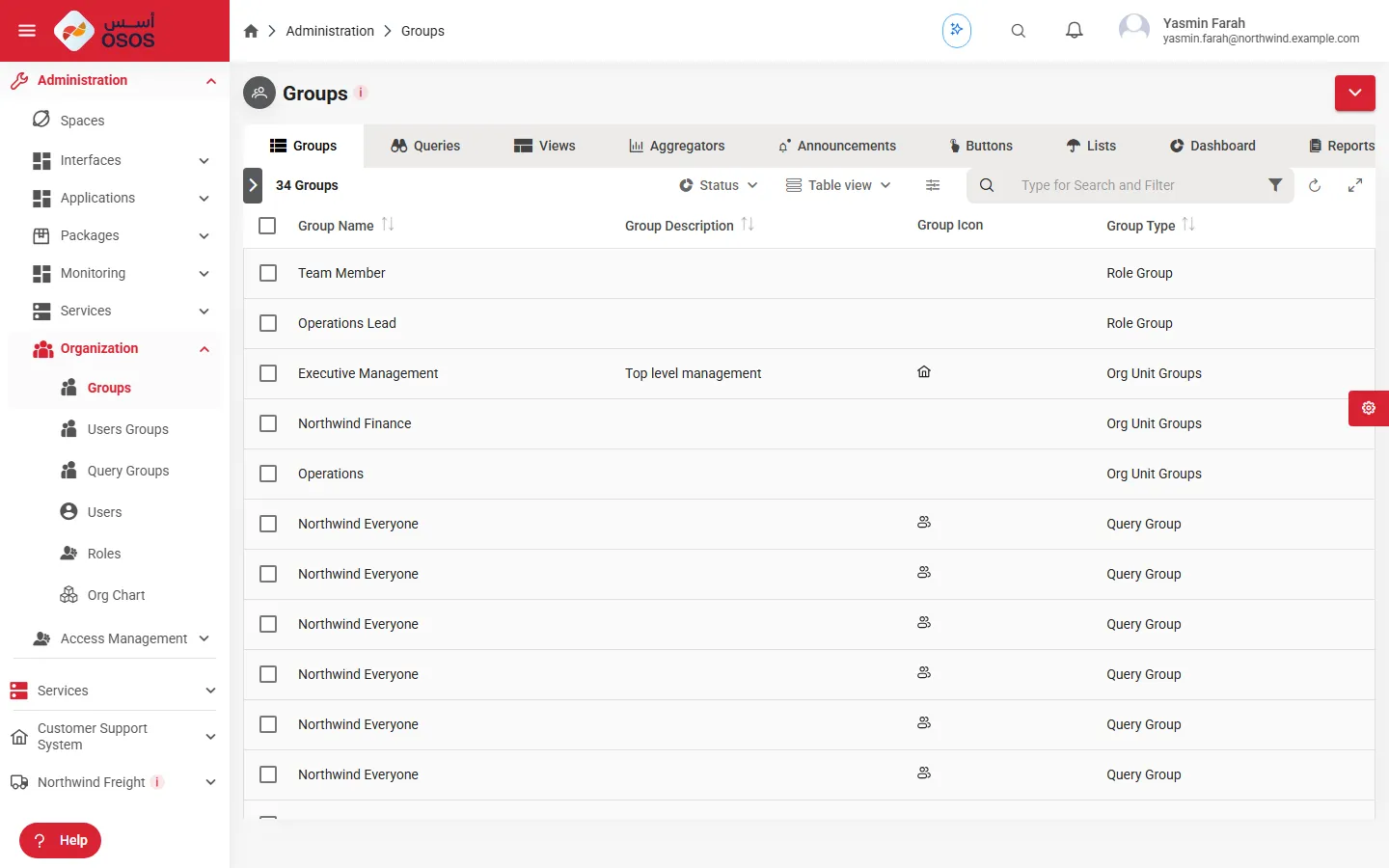 What to notice: one list, four kinds. Only the two you created can be edited; the role and org unit groups follow the org chart.
Check.
- Northwind Safety Committee is a Users Group with Ziad, Dana and Majd.
- Northwind Everyone is a Query Group whose members are the Northwind people, without the fleet tracker.
- Northwind Dispatch appears as an Org Unit Group, with Ziad and Hala.
- Northwind Dispatcher appears as a Role Group.
- You added nobody to Northwind Dispatch or Northwind Everyone by hand.
Pass condition. Both new groups exist with the right members, and you found the org-unit and role groups the org chart created.
If something goes wrong
| What you see | What to do |
|---|---|
| A member you added does not appear | You selected DONE but not Save Changes. Add them again and confirm. |
| Northwind people is not offered in query | The saved query is missing from your tenant. Ask your training contact to re-run the Northwind seed. |
| Someone is missing from Northwind Everyone | Their details do not match the query: open their user record and compare the email address and User Type. |
| You cannot edit Northwind Dispatch | It is an org unit group. Change the org chart instead. |
Model answer
What you now have, and why:
- Northwind Safety Committee is hand-picked across units, so it can only be a Users Group, and you must keep it up to date yourself, which is why leavers come out of it in M2.
- Northwind Everyone holds every Normal user with a Northwind address. When a new person is added with that address, they join it by themselves. In M2 you give this group the base level, so no new joiner is ever forgotten again. The fleet tracker is left out because it is an Application user: a system gets only the access its job needs, never a staff-wide grant.
- Northwind Dispatch and Northwind Dispatcher came from M1-S2. Hala joined both the moment you saved her assignment.
✳ Discussion (13 min) — Which kind of group?
Section titled “✳ Discussion (13 min) — Which kind of group?”Three requests reach you. For each, choose the kind of group and say how its membership will stay right.
- “Every finance employee should get the monthly budget notification.”
- “The audit project team (two from Finance, one from Dispatch, Samir) needs a shared report for three months.”
- “All dispatchers, including the ones in the future Fleet Maintenance unit, must see the driver roster.”
With a facilitator. In pairs, decide each case (6 min), then compare across the room; where pairs differ, agree which choice needs less maintenance and less risk (3 min).
On your own. Write the kind of group and one sentence of reasoning for each case, then compare with the model answer.
Model answer
- Org Unit Group of Northwind Finance. Finance is a unit, and its group follows the org chart: a new finance employee gets the notification the day their assignment is saved.
- Users Group, for example Northwind Audit Project. No unit or rule describes these four people. Because it is hand-kept and temporary, write its end date in its description and remove it (or its access) when the project ends.
- Role Group of Northwind Dispatcher. The need follows the position, not the unit: a dispatcher placed in Fleet Maintenance later still holds the role, so they get the roster.
✓ Practice (4 min) — Check your understanding
Section titled “✓ Practice (4 min) — Check your understanding”Northwind wants every person with the job title “Driver” on their user record to receive safety alerts. Drivers are spread across several units. Which group do you create?
Check your answer
The correct answer is B. Open the explanation under each option to see why.
Ziad left Dispatch for another company and his account was deactivated. Requests owned by the Northwind Safety Committee group still sometimes land with him. Why?
Check your answer
The correct answer is B. Open the explanation under each option to see why.
You try to remove Hala from the Northwind Dispatch group, but the group cannot be edited. What is the right way to take her out?
Check your answer
The correct answer is C. Open the explanation under each option to see why.
↺ Recap (1 min) — After Module 1 you can
Section titled “↺ Recap (1 min) — After Module 1 you can”After this module you can set up Northwind’s people: add people and systems as users and close accounts the right way, build a branch of the org chart with roles and managers, predict where approvals land, and choose the group that keeps itself up to date. Hala now has a role, a manager and three groups (her unit’s, her role’s and Northwind Everyone), but she still cannot open anything.
Next. Module 2 is about access: who can see and do what. You give Northwind its base level through Northwind Everyone, and you finally open the shipment board to Dispatch.