
M2-S1 — The workflow, its steps and their owners
Section titled “M2-S1 — The workflow, its steps and their owners”| Module | M2 — Route the ticket |
| After this session you can | Add a workflow to an entity and give each step the right owner, with a fallback. |
| Time | Facilitated: 40 min · On your own: 40 min |
| Before you start | M1-S1: Support Tickets exists with its nine fields. From ACP: M5-S1, where you took part in a two-step workflow. |
| Go deeper | Build the workflow · Workflows & approvals |
◆ Orientation (1 min) — From taking part to designing the route
Section titled “◆ Orientation (1 min) — From taking part to designing the route”In ACP you submitted a leave request and approved it as Omar: you used a two-step workflow someone else designed. Now you design one. A support ticket needs five steps and four kinds of owner, and this session builds them. The next session connects the steps with actions and sets which fields each person may touch.
▤ Concept (4 min) — Steps, owners and the route
Section titled “▤ Concept (4 min) — Steps, owners and the route”The route of a ticket
Section titled “The route of a ticket”A workflow is the route a record follows. It is made of steps; each step has an owner, who must act, and actions, the buttons that move the record on. When you add a workflow, the platform creates two steps for you: an initial step, always owned by the person who created the record, and a final step that ends the route. You add your own steps between them.
flowchart LR
  O["Open Ticket<br/>(the customer)"] -->|Send Request| H["Help Desk<br/>(Technical Support Office)"]
  H -->|Send to Processing| P["Processing Ticket<br/>(the person in Assigned to)"]
  H -->|Manager Approval| M["Manager Approval<br/>(Support Manager)"]
  H -->|Send Solution| S["Service Evaluation<br/>(the customer)"]
  H -->|Close Ticket| C["Complete Step"]
  P -->|Review Solution| H
  M -->|Approve / Reject| H
  S -->|Done| H
What to notice: every route comes back to Help Desk, and only Help Desk can end the workflow. The desk stays in control of every ticket.
Four ways to choose an owner
Section titled “Four ways to choose an owner”| The step should go to… | Step Owner | Then | In the ticket workflow |
|---|---|---|---|
| A team, any member of which may pick it up | Group | Group Type Fixed, the Group Name; Select User Type Single User; Choose Selection Type Take Ownership | Help Desk: Technical Support Office |
| One named person | User | User Type Fixed, the User Name | Manager Approval: Support Manager |
| The person written in a field of the record | User | User Type Field, the Field Name | Processing Ticket: whoever is in Assigned to |
| Whoever acted at an earlier step | User | User Type Previous Step Owner, the Step Name | Service Evaluation: the owner of Open Ticket, the customer |
Take Ownership. With a group as owner and Take Ownership, nobody is assigned at first: the ticket waits for the whole team, and the first member who opens it and selects Take Ownership claims it. The other choices are First one (the group’s first member gets it automatically) and Org Unit Manager. Take Ownership suits a desk where whoever is free picks up the next ticket.
When the owner cannot be found: Fallback Assignment
Section titled “When the owner cannot be found: Fallback Assignment”A fixed person always exists. The other three kinds can come up empty: Assigned to may be blank, a group may have no active member. So whenever the owner is anything other than one fixed person, the step dialog adds Fallback Assignment 1 and requires it: who gets the ticket if the owner cannot be found. End the chain with one specific person. In this system, every fallback is Support Manager: a ticket that would otherwise be stuck lands on the manager’s desk.
⛏ Lab (28 min) — Add the workflow and its four steps
Section titled “⛏ Lab (28 min) — Add the workflow and its four steps”With a facilitator. The facilitator plays the video, or builds it live in the same order, before the lab starts.
On your own. Watch the video once before you start. The lab below gives every step in writing, so you can also go straight to it without the video.
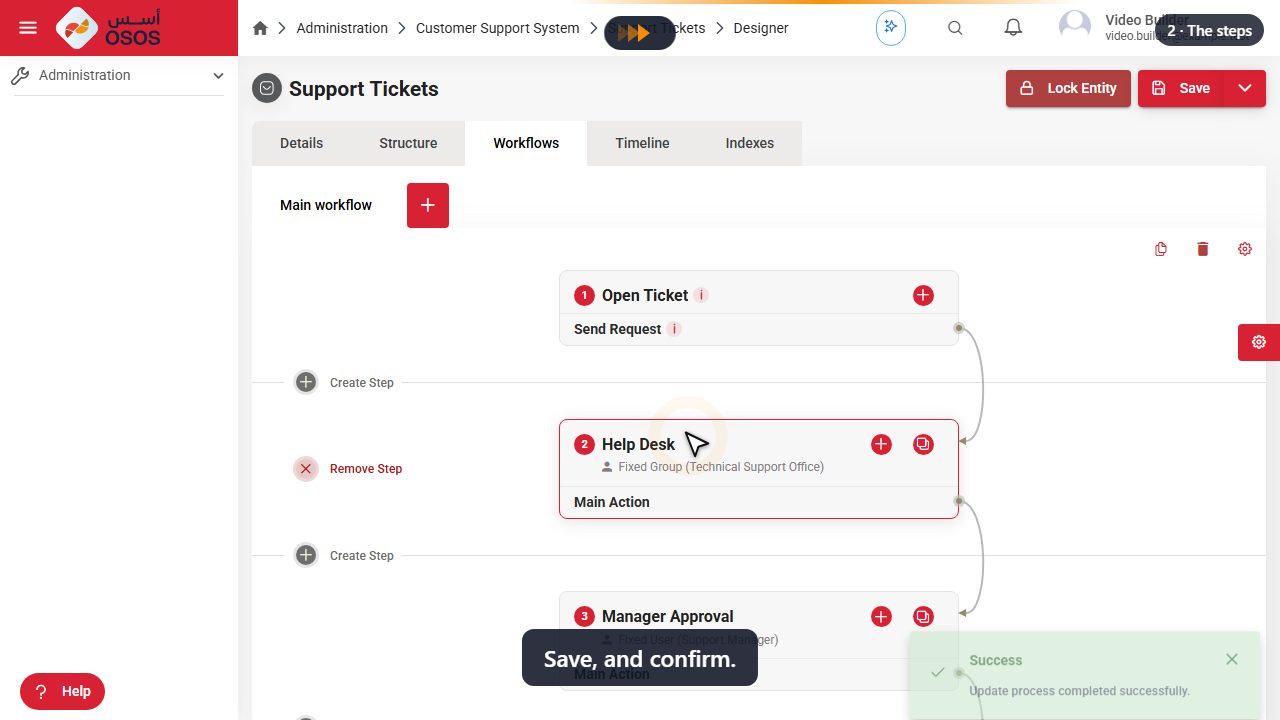
Tutorial · Part 2 of 8 · 3 min 20 s
Five steps, three kinds of owner
What to notice: The workflow’s route: the Initial Step is renamed Open Ticket and always belongs to whoever opens the ticket. Help Desk belongs to a group, with Take Ownership and a Fallback Assignment 1. Manager Approval belongs to one fixed person, Processing Ticket to whoever is in Assigned to, and Service Evaluation back to the customer. Five steps, three kinds of owner.
Goal. Give Support Tickets a workflow with the steps Open Ticket, Help Desk, Manager Approval, Processing Ticket and Service Evaluation, each with its owner.
Before you start. Signed in as yourself. Support Tickets saved, from M1-S1.
Create the workflow
- Open Administration › Applications › Modules › Customer Support System, open Support Tickets and edit it (Edit Entity). Select the Workflows tab.
- Select Add A Workflow. The workflow appears with an Initial Step and a Complete Step.
- Select the Initial Step and rename it Open Ticket.
- Select its action and, in Action Settings, rename it Send Request.
Create the steps
For each step, select Create Step below the step you created last, so the steps sit in route order between Open Ticket and Complete Step. In the Create New Step dialog, enter the Name, keep Step Type Normal, set the Main Action to Next Step (you point it at the right step in M2-S2), leave Return and Reject unticked, set the owner, then select Done.
- Help Desk: Step Owner Group, Group Type Fixed, Group Name Technical Support Office, Select User Type Single User, Choose Selection Type Take Ownership.
- In the same dialog, set Fallback Assignment 1 to User, Fixed, Support Manager. Select Done.
- Manager Approval: Step Owner User, User Type Fixed, User Name Support Manager. Select Done. (A fixed person needs no fallback.)
- Processing Ticket: Step Owner User, User Type Field, Field Name Assigned to.
- Set its Fallback Assignment 1 to User, Fixed, Support Manager. Select Done.
- Service Evaluation: Step Owner User, User Type Previous Step Owner, Step Name Open Ticket.
- Set its Fallback Assignment 1 to User, Fixed, Support Manager. Select Done.
- Select Save at the top of the designer, then Save Changes.
Screenshot pending The Create New Step dialog for Help Desk: Step Owner Group, Group Name Technical Support Office, Single User with Take Ownership, and Fallback Assignment 1 set to Support Manager What to notice: the fallback appears only because the owner is a group. Take Ownership leaves the ticket unassigned until a desk agent claims it.
Screenshot pending The Workflows tab with the five steps in route order between Open Ticket and Complete Step What to notice: the steps are in route order. The actions still all point to the next step; you fix that in M2-S2.
Check.
- The workflow shows Open Ticket, Help Desk, Manager Approval, Processing Ticket, Service Evaluation and Complete Step, in that order.
- Open Ticket’s action is named Send Request.
- Each step has the owner in the table under Four ways to choose an owner.
- Help Desk, Processing Ticket and Service Evaluation each have Support Manager as Fallback Assignment 1.
Pass condition. The entity saves with five steps in route order, each owned as planned, and the designer shows no This workflow is invalid message.
If something goes wrong
| What you see | What to do |
|---|---|
| Technical Support Office is not in Group Name | The group is missing from your space. Ask your administrator (M0-S1). |
| Done stays greyed out in Create New Step | A required setting is empty: the step Name, the owner, or Fallback Assignment 1. |
| A step landed in the wrong place | Delete it (Remove Step) and create it again under the right step. A step that another step’s action targets cannot be deleted: point that action elsewhere first. |
| Assigned to is not offered in Field Name | Only User fields are offered. Check that Assigned to was created as a User field in M1-S1. |
| This workflow is invalid | Normal while actions are unfinished; if it stays after M2-S2, see that session’s troubleshooting. |
Model answer
The owners, and why each kind was chosen:
- Open Ticket: whoever creates the ticket (automatic for the initial step).
- Help Desk: the group Technical Support Office with Take Ownership, because any free desk agent may pick up the next ticket. Fallback Support Manager, in case the group has nobody.
- Manager Approval: the fixed person Support Manager: there is one approver, by name.
- Processing Ticket: the Field Assigned to, because the desk chooses the representative per ticket. Fallback Support Manager, for a ticket sent on with Assigned to empty.
- Service Evaluation: Previous Step Owner of Open Ticket, which is the customer who opened the ticket. Fallback Support Manager.
◇ Worked scenario (1 min) — Owners for a facilities repair request
Section titled “◇ Worked scenario (1 min) — Owners for a facilities repair request”A facilities team asks for a Repair Request: staff report a fault; the facilities desk triages it; a named technician repairs it; repairs over a budget need the requester’s own manager to agree; the requester confirms the fix. Decide each owner before reading on.
Triage. Any of three desk members can do it, and whoever is free should: a Group with Take Ownership. First one would always load the same person.
Repair. The desk picks the technician per request and writes the name in a Technician field: User, Field, Technician, with a fixed fallback for when the field is empty.
Budget approval. It goes to the requester’s manager, who differs per request: User, Previous Step Owner of the initial step, then Relative with Relation Manager. This works only if the administrator has recorded each person’s manager; the fallback covers people without one. You build exactly this in Module 9.
Confirmation. The person who reported the fault: Previous Step Owner of the initial step, without Relative.
✓ Practice (5 min) — Check your understanding
Section titled “✓ Practice (5 min) — Check your understanding”At Processing Ticket the owner is the user in Assigned to. The desk sends a ticket on but forgets to fill Assigned to. What happens?
Check your answer
The correct answer is B. Open the explanation under each option to see why.
A training centre routes Course Bookings. Three coordinators share bookings; whoever is free takes the next one. After approval, the trainer chosen on the booking prepares the material.
How should the coordinators’ step be owned?
Check your answer
The correct answer is B. Open the explanation under each option to see why.
How should the trainer’s step be owned?
Check your answer
The correct answer is C. Open the explanation under each option to see why.
A step owned by one fixed person still needs a Fallback Assignment.
Check your answer
The correct answer is B (False). Open the explanation under each option to see why.
↺ Recap (1 min) — What you can do now
Section titled “↺ Recap (1 min) — What you can do now”You added a workflow and gave each of its steps the right owner: a group that claims work, a named person, a person named in the record, and the customer who opened the ticket, with a fallback wherever the owner could be missing.
Next. The steps exist but are not yet connected. In M2-S2 you give each step its actions, point every action at the right step, and decide which fields each person may see and change.