
M1-S1 — The need, the module and the Support Tickets entity
Section titled “M1-S1 — The need, the module and the Support Tickets entity”| Module | M1 — Model the ticket |
| After this session you can | Turn a business need into an entity whose fields have the right types, and build it. |
| Time | Facilitated: 52 min · On your own: 52 min |
| Before you start | M0-S1: your practice space is ready. From ACP: M6-S1, where you created a module and an entity. |
| Go deeper | Understand the business need · Field types · Block field |
◆ Orientation (1 min) — Start from the need, not from the screen
Section titled “◆ Orientation (1 min) — Start from the need, not from the screen”Customers of a fictional company report problems by phone and email. Requests get lost, nobody can say who is handling what, customers do not know where their request stands, and managers have no figures. The business wants one place for every request, clear routing, quality control before an answer goes out, customers kept informed, and figures for managers.
Each of those goals becomes a piece you build in the next five modules. This session builds the first one: the record every request lives in, a Support Ticket. You already know how to create a module and an entity (ACP M6-S1). What is new here is choosing the right type for each field, and grouping fields so that a workflow can show or hide them together later.
▤ Concept (5 min) — From the need to the fields
Section titled “▤ Concept (5 min) — From the need to the fields”Read the need for data
Section titled “Read the need for data”Go through the goals and ask, for each one, what must the ticket hold for this to work?
| Goal | What the ticket must hold | Field |
|---|---|---|
| One place, every ticket numbered | A number given by the system | Ticket number |
| Customers describe the problem | A title and a description, in Arabic or English | Ticket title, Ticket description |
| Clear routing, everyone knows the state | A status from a fixed list; the representative chosen | Ticket status, Assigned to |
| Figures for managers | When the ticket was opened and closed | Start date, End date |
| Quality control | The representative’s answer | Solution |
| Customers rate the service | A score and a comment | Service evaluation |
Five field types you have not used yet
Section titled “Five field types you have not used yet”In ACP you used Text, Long-text, Category, User and Date. The ticket needs five more:
| Type | What it does | On the ticket |
|---|---|---|
| Sequence | The system gives each new record the next number, once, when the record is created. Nobody types it, and two records never get the same number. | Ticket number |
| Localized Text | One line of text that can be entered in each language, so an Arabic-speaking and an English-speaking user each read their own. | Ticket title, Ticket description, the Solution text |
| Date-time | A date together with a time of day. A plain Date has no time. | Start date, End date |
| Block | A group of fields that belong together. A block holds no value of its own; the fields inside it do. | Solution, Service evaluation |
| Category with numbers as options | A category whose options are scores, here 1 to 5: people pick one; nothing is typed. | Evaluation score |
Why two fields sit in blocks
Section titled “Why two fields sit in blocks”The ticket passes through five people. The customer must not see an empty Solution box while opening a ticket; the representative must be able to write the solution but not the customer’s rating; the customer must rate the service but not change the solution. In Module 2 you will set, for every step of the route, which fields are hidden, locked or editable. A block lets you set that once for a whole group: the Solution block and the Service evaluation block each switch on and off as a unit.
Required, default, and who fills a field
Section titled “Required, default, and who fills a field”Required means a record cannot be saved without the field. Tick it only for what the person creating the ticket must always give: the title, the description, the status and the start date. Assigned to and End date are filled later, by the desk, so they are not required; making them required would stop the customer from opening a ticket at all. The Ticket status gets a Default Value, Open, so a new ticket starts in the right state without anyone choosing it.
⛏ Lab (38 min) — Create the module and the Support Tickets entity
Section titled “⛏ Lab (38 min) — Create the module and the Support Tickets entity”With a facilitator. The facilitator plays the video, or builds it live in the same order, before the lab starts.
On your own. Watch the video once before you start. The lab below gives every step in writing, so you can also go straight to it without the video.
Tutorial · Part 1 of 8 · 3 min 14 s
The module and the ticket
What to notice: Create the module in both languages and keep the normalized name it fills in, because it cannot be changed later. Then follow the field order: Ticket number numbers itself, Ticket status is a Category with five options, Assigned to stays optional, and Solution and Service evaluation come last. The default value of Ticket status (Open) is set in a second save. The video shows the module and entity only; the workflow comes in the next session.
Goal. Create the Customer Support System module and the Support Tickets entity with its nine fields, exactly as the plan above.
Before you start. Signed in as yourself, on the web. Keep the field table of the concept in view.
Create the module (as in ACP M6-S1)
- Open Administration › Applications › Modules and select Add Module.
- In the NEW MODULE dialog, enter the Name Customer Support System in English and نظام دعم العملاء in Arabic. Keep the Normalized name filled in for you. Pick the Icon phone. Leave Administration Access empty.
- Select DONE. Customer Support System is listed.
Create the entity
- Open Customer Support System. On its Entities tab, select Add Data Entity.
- Enter the Name Support Tickets in English and تذاكر الدعم in Arabic, keep the Normalized name, pick the icon wrench, check that Choose Module shows Customer Support System, and keep Data Entity Type as Normal Entity.
- Under Field Settings, set Single Name to Support Ticket and Plural Name to Support Tickets, in both languages.
- Select Create. The entity’s designer opens. Select the Structure tab.
Add the fields
- Drag Sequence onto the empty area and name it Ticket number. Leave Required off: the system fills it.
- Drag Localized Text and name it Ticket title; tick Required. Do the same for Ticket description.
- Drag Category and name it Ticket status; tick Required. Open its settings and, under Add options, add Open, In Progress, Responded, Duplicate and Closed.
- Drag User and name it Assigned to. Leave Required off.
- Drag Date-time and name it Start date; tick Required. Drag another Date-time and name it End date; leave Required off.
- Drag Block and name it Solution. Drag a Localized Text field into the block and name it Solution.
- Drag another Block and name it Service evaluation. Drag a Category into it, name it Evaluation score, and add the options 1, 2, 3, 4 and 5. Then drag a Long-text into the block and name it Comment.
- Select Save, then Save Changes.
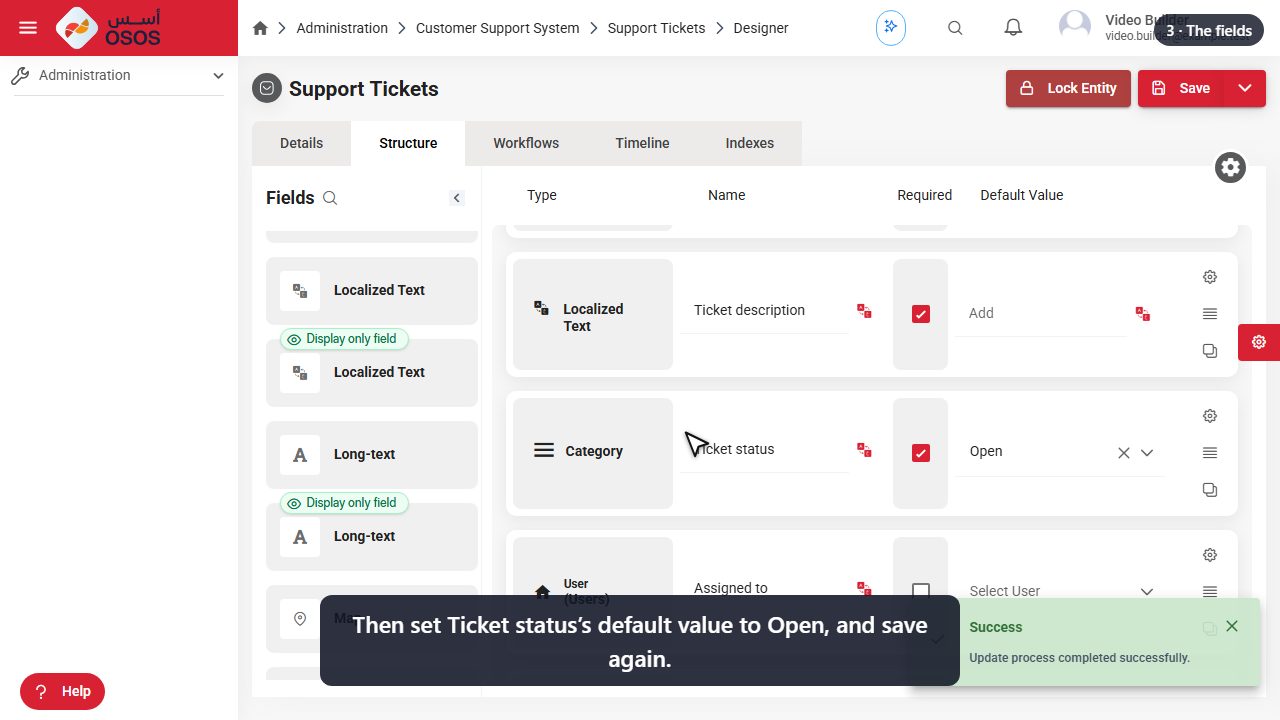
- Open the Ticket status settings again and set Default Value to Open. Select Save, then Save Changes. (As in ACP, the default can be chosen only after the options were saved once.)
Screenshot pending The Structure tab of Support Tickets, with the nine fields and the two blocks Solution and Service evaluation holding their own fields What to notice: the blocks are indented groups; Evaluation score and Comment belong to Service evaluation, not to the ticket directly. Required is ticked only on the four fields the customer must give.
Check.
- Customer Support System is in Administration › Applications › Modules, with the icon phone.
- Support Tickets has seven fields of its own and two blocks, with the types in the plan.
- Ticket title, Ticket description, Ticket status and Start date are required; nothing else is.
- Ticket status has five options and the default Open.
- Solution holds one field, and Service evaluation holds Evaluation score (options 1 to 5) and Comment.
Pass condition. The Support Tickets designer saves without errors and shows the nine fields, with Ticket status defaulting to Open.
If something goes wrong
| What you see | What to do |
|---|---|
| A field landed outside its block | Drag it onto the block’s area until the block is highlighted, then drop it. |
| Default Value for Ticket status is empty | Save the entity once with the options, reopen the field’s settings, then choose Open. |
| Save greyed out with no message | See the Date-time note above, then check every new field has a name. |
| The Normalized name is refused | A module or entity with that name exists in this space. Ask for a fresh practice space; do not rename, because later labs use the names. |
| You named a field wrongly | Rename it now, in its settings: renaming is a safe change. Later labs refer to these names. |
Model answer
The finished structure, row by row: Ticket number (Sequence) · Ticket title (Localized Text, required) · Ticket description (Localized Text, required) · Ticket status (Category, required, options Open, In Progress, Responded, Duplicate, Closed, default Open) · Assigned to (User) · Start date (Date-time, required) · End date (Date-time) · Solution (Block: Solution, Localized Text) · Service evaluation (Block: Evaluation score, Category 1 to 5; Comment, Long-text).
Why: the number is the system’s job (Sequence), the customer’s words may be in either language (Localized Text), dates need the time of day for response figures (Date-time), and the two blocks are the two pieces of the ticket that different people own at different steps.
◇ Worked scenario (2 min) — Typing the fields of a warranty claim
Section titled “◇ Worked scenario (2 min) — Typing the fields of a warranty claim”A colleague asks you to model a Warranty Claim: a customer claims a repair under warranty, attaches the purchase receipt, says when the fault started, and the workshop later records the repair cost and the technician’s notes. Decide each type before you read on.
The claim number. People quote it on the phone, so the system must give it: Sequence.
When the fault started. Customers know the day, not the minute: Date, not Date-time. Choosing Date-time would force a time nobody knows.
The purchase receipt. A file people upload: File (or Image if only photos are accepted).
Repair cost and technician’s notes. These belong to the workshop and are filled at one step of the process, so put them in a Block named Repair, holding a Number for the cost and a Long-text for the notes. Later the workflow can hide the whole block from the customer until the repair is done.
What is required? Only what the customer gives when claiming: the date and the receipt. The repair block’s fields stay optional, for the same reason Assigned to is optional on a ticket.
✓ Practice (5 min) — Check your understanding
Section titled “✓ Practice (5 min) — Check your understanding”A ticket needs a reference that customers quote on the phone, given in order and never repeated. Which field type do you use?
Check your answer
The correct answer is B. Open the explanation under each option to see why.
Why does the tutorial put Evaluation score and Comment inside a Service evaluation block instead of directly on the ticket?
Check your answer
The correct answer is B. Open the explanation under each option to see why.
A builder ticks Required on Assigned to. What happens when a customer opens a ticket?
Check your answer
The correct answer is C. Open the explanation under each option to see why.
Which of these should be Date-time rather than Date? Select all that apply.
Check your answer
The correct answers are A and C. Open the explanation under each option to see why.
↺ Recap (1 min) — What you can do now
Section titled “↺ Recap (1 min) — What you can do now”You read a business need for data, chose a type for each field, and built Support Tickets with a system-given number, two-language text, date-and-time fields, a status with a default, and two blocks.
Next. A ticket that just sits there helps nobody. In Module 2 you give it a route: five steps, an owner for each, and the actions that move it from the customer to the desk and back. The blocks you made here are what the route will show and hide.